We use cookies on our website to provide you with the best possible service and to further improve our website. By clicking the "Accept All" button, you agree to the use of all cookies. You can limit the cookies used by clicking on "Accept selection". Further information and an option to revoke your selection can be found in our privacy policy.

Necessary:

These cookies are necessary for basic functionality. This allows you to register on our website and forum or order products with our online shop.

Statistics:

With these cookies, we collect anonymized usage data for our website. For example, we can see which content is interesting for our visitors and which resolutions are used. We use the information to optimize our website to provide you with the best possible user experience.

Necessary
Statistics

show more

PCAN-Explorer 6: Instruments Panel Add-in 6

Optional Function Upgrade for the PCAN-Explorer


All prices are plus the at present valid value added tax!

End of Life - The Software will be Discontinued


Please note: The PCAN-Explorer 6 will only be available until January 28, 2027. Maintenance and support for the product will end on January 28, 2028. Add-ins for the PCAN-Explorer 6 can only be purchased until January 28, 2027. We recommend to consider an upgrade to the PCAN-Explorer 7.

Ordering Add-ins for existing PCAN-Explorer 6 licenses:

If you order an Add-in for an existing PCAN-Explorer 6 license, we will require the corresponding license ID to process your order. Please reference your license ID in the comment field on the bottom of the checkout page
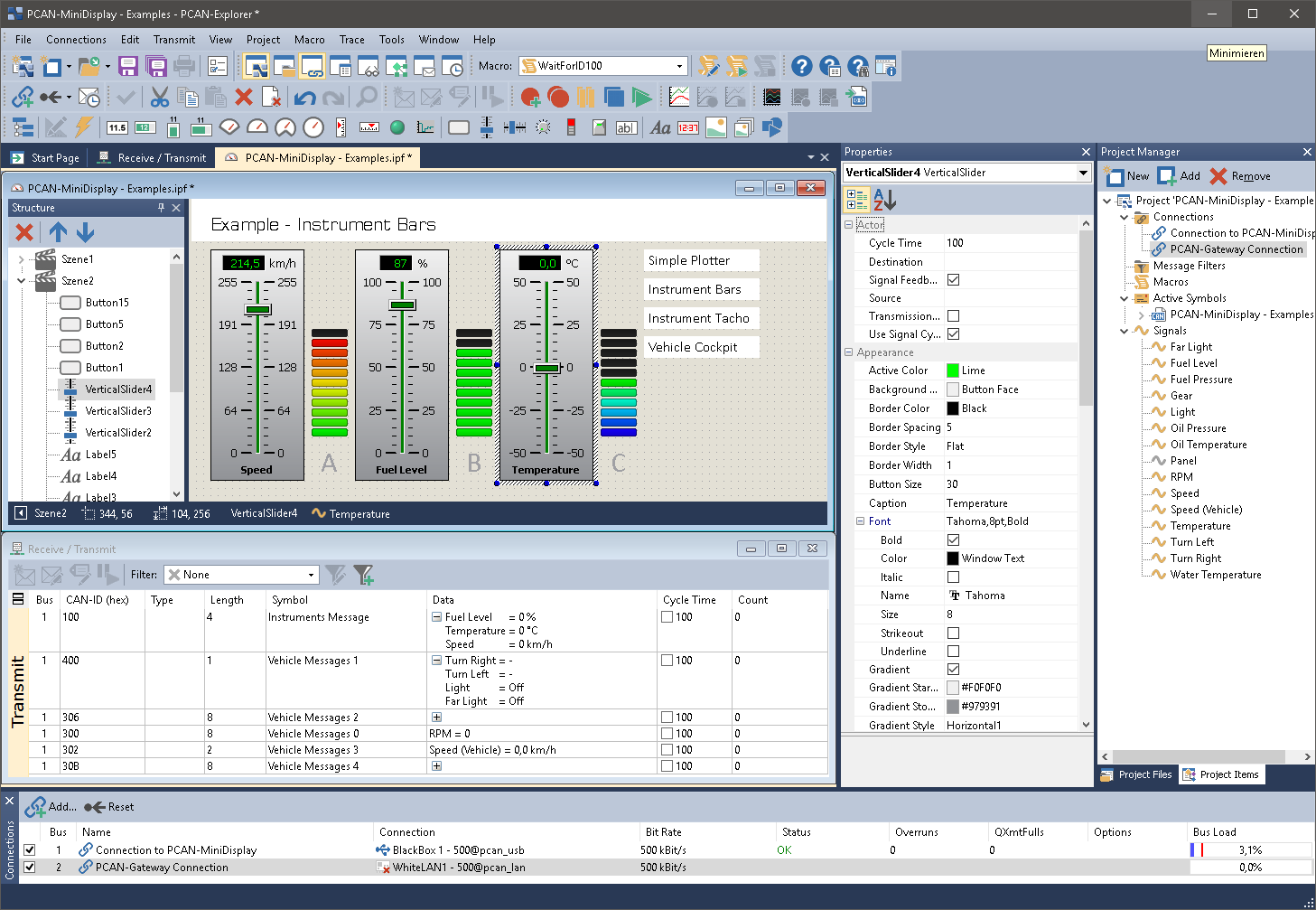
Description

The Instruments Panel Add-in allows the graphical representation of digital and analog signals using different display instruments. The integrated input options and controllers make it possible to also generate signals on the CAN bus, allowing easy simulation of complex CAN applications.

Features

  • Representation of analog and digital signals from received CAN messages using different display instruments
  • In addition to potentiometers, switches, and sliding controllers, input fields can be used to generate CAN messages
  • New instruments like an analog 360° gauge and a shape element for displaying squares, rectangles, circles, and ellipses
  • Selection and configuration of multiple elements at the same time
  • Extensive configuration of the properties of one or more elements using the property window
  • The Instruments Panel object model enables complete automation using COM and scripts
  • Representation of different scenes on the same panel during runtime
  • Signal-dependent display of image lists and scenes
  • Free positioning of the instruments using drag & drop, or numerical inputs for spot-on positioning
  • Loading and storing of complete panel configurations
     

System requirements


  • PCAN-Explorer 6
  • Windows® 11 (x64/ARM64), 10 (x86/x64)
  • Free USB port for installation stick and copy protection dongle

Scope of Supply

  • Installations files for Instruments Panel Add-in
  • Single computer license or portable license with USB copy protection dongle
  • Documentation in HTML help format
     

Note: Software delivery on USB stick. Alternative installation media or download on request.

More

Additional information

Suitable to be used with

  • PCAN-Explorer 6: Professional Windows® software to communicate with CAN and CAN FD buses